


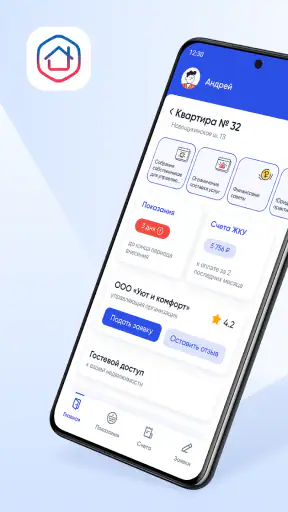

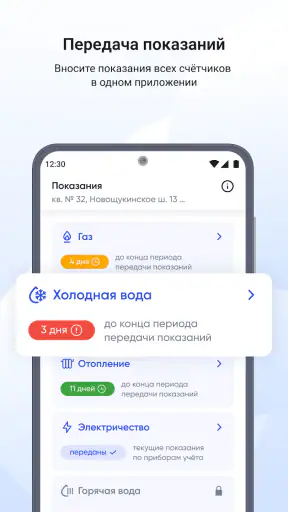
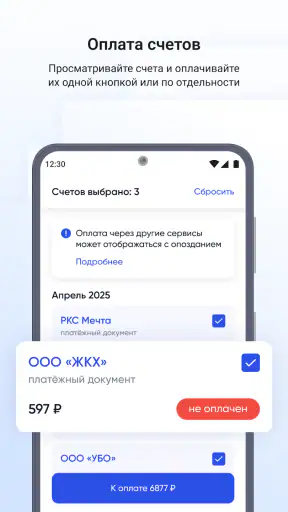
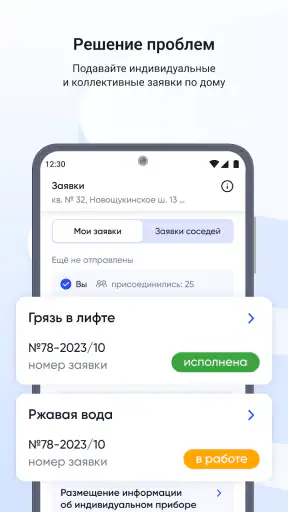


Housing and communal services are easy to ignore until something goes wrong: a payment looks incorrect, a repair is delayed, or a building issue needs to be reported and followed up. Госуслуги Дом is designed to put those everyday housing questions into one place rather than making residents search through paper notices, separate contacts, and scattered conversations. I found it most useful as a practical control point for apartment-building matters, especially when I wanted a clear record of what I had already checked or reported.
This is a free House & Home app from Оператор информационной системы. It is available to everyone by age rating, runs on Android from version 9 onward, and the current release is 4.9.0. Its scale also suggests that it is not a niche experiment: the app has passed five million installs, while its average score is 3.8 from roughly sixty-seven thousand ratings. That combination tells me to approach it as a useful public-service tool with some room for improvement, not as a flawless replacement for every housing-related service.
How I use Госуслуги Дом for ordinary building problems
Starting with the home and its details
The sensible first step is to open the app and make sure the correct home and apartment information are connected to the account. This sounds routine, but it matters more here than it would in a simple note-taking app. Housing requests, building information, and service-related questions only make sense when they are attached to the right property. I would not rush past the initial checks, particularly if I manage more than one address or use the app on behalf of a family member.
Once the right home is selected, I treat the application as a place to investigate before contacting someone directly. Instead of immediately calling a management company about a dark stairwell or a leaking entrance, I first look through the available building and service information. That can help separate a general building issue from something specific to my apartment. It also gives me a better description to use when I submit a request, which is more useful than writing a vague message such as “there is a problem downstairs.”
The basic workflow is straightforward: identify the issue, check the relevant housing information, submit or follow the matter through the app when that option is available, and keep an eye on the result. I like this approach because it creates a repeatable habit. The app is not just a directory of contacts; it can become the first place I look whenever the question concerns the building, communal services, or the responsibilities around maintaining shared spaces.
A realistic evening scenario
Imagine coming home after work and finding that the entrance door does not close properly. My first move would be to confirm that the issue affects the shared entrance rather than only my key or intercom. I would then open the app, check the building context, and describe the problem with the location and practical consequence: the door remains open, residents cannot rely on it being secured, and the issue appeared that evening. If the application allows the matter to be submitted through the relevant housing workflow, I would use that rather than sending the same complaint to several unrelated contacts.
The important benefit is not that an app magically repairs the door. It is that I can make the report in a more organized way and return to the same place to see what happened. I would save the time of writing down every detail separately, but I would still keep realistic expectations about response speed. A digital request is a better starting record; it is not proof that the physical work has already been scheduled or completed.
What makes the workflow better than scattered alternatives
The usual alternative is a mixture of methods: a noticeboard in the entrance, a telephone number from an old receipt, a message to a building chat, and perhaps a visit to a service office. Those routes may still be necessary in urgent situations, but they are difficult to organize. A chat can be fast yet informal, while a phone call can be useful but leave me without a convenient written trail. Госуслуги Дом is stronger when I want housing matters connected to the property rather than buried in a conversation.
I would not use it as my only tool for an immediate danger. A serious electrical hazard, flooding that is actively spreading, or another urgent threat needs the appropriate emergency channel first. The app is better for documenting, checking, and following ordinary communal-service issues. That distinction is one of the most important practical lessons: convenience should not delay a response when the problem requires immediate human intervention.
Settings and account checks worth doing early
Experienced use starts with a little preparation. I would review notification settings so that updates about requests or housing matters do not disappear unnoticed. At the same time, I would avoid enabling every alert without thinking. Too many notifications can make important messages blend into routine phone activity, especially for someone who already receives a lot of service and government alerts.
I would also check the account and property selection whenever something looks inconsistent. A surprising address, missing building context, or unfamiliar information is a reason to pause and verify the profile rather than continuing as if nothing happened. This is a simple but valuable habit because the quality of any housing request depends on the property it is associated with.
Another setting-related habit is keeping the app current. The release installed on my device is version 4.9.0, and updates can change the location of controls or improve compatibility. I would not assume that instructions remembered from an older release still match the screen in front of me. When helping a relative, I would ask them to show the current screen instead of giving rigid directions based on memory.
The age rating is Everyone, which makes the app approachable for a broad household audience. That does not remove the need to be careful with account access. If several people use the same device, I would make sure the active account is the one belonging to the resident who should receive the information. Convenience is useful only when it does not mix one person’s housing details with another person’s session.
Small habits that reduce repeated work
My most useful shortcut is to prepare the facts before opening the request form. I note the exact place, what is happening, when I noticed it, and whether it affects one apartment or shared space. That takes less time than trying to reconstruct the situation while typing, and it produces a more actionable report. For recurring problems, I also keep a simple personal record of the date and the wording I used, because it helps me describe a repeated failure without exaggerating it.
I would also use the app at a calm moment rather than waiting until I am frustrated. A quick check of building information can answer a question before it becomes a complaint. For example, if I am unsure whether a charge or service relates to the whole building or my own unit, looking through the available information first can prevent a poorly directed request. This is where the app feels more valuable than a single-purpose payment or messaging tool: it supports a small investigation before action.
For family use, I would establish one shared routine. One person can check new information, another can report a physical issue, but both should know where the current request stands. That avoids duplicate complaints that describe the same problem differently. The app works best when the household treats it as a common record rather than as another isolated inbox.
Where the app is genuinely convenient
The strongest use case is the resident who wants a central place to deal with building-related questions without remembering every organization involved. The app’s purpose is focused on housing and communal services, so it makes more sense for a leaking roof, a damaged shared area, service questions, or building information than a general notes app or a neighborhood social network.
I also see value for people who move often or manage a property remotely. They may not know the local contacts by heart, and a clear property-centered workflow is easier to revisit than a collection of screenshots and forwarded messages. The advantage is not that every issue is solved inside one screen; it is that the first step and the follow-up history are easier to keep together.
Residents who prefer paper notices, direct calls, or face-to-face communication may find the app less compelling. It asks them to use an account-based digital process, and that can feel like extra work when the building office is nearby or the issue is already being handled through a trusted local channel. I would recommend it as an additional route, not as a demand that every resident abandon the methods that work for them.
The limits I noticed in a digital housing workflow
Housing services are complicated because responsibility can be divided between a management organization, utility providers, municipal services, and emergency operators. An app can help me describe and route a question, but it cannot remove those boundaries. If a request stalls because another organization must act, the app may still leave me needing to contact that organization directly. That is a limitation of the real-world process as much as of the interface.
I also would not assume that every building presents the same amount of information or the same set of actions. The usefulness of a property-focused service depends on how well the relevant records and workflows apply to that home. If I open the app and find that a particular question is not covered, I would switch to the responsible provider rather than repeatedly searching for a button that may not exist for that situation.
The 3.8 average rating from around sixty-seven thousand ratings reflects a mixed experience among a large audience. I read that as a reason to be patient with login, property verification, or occasional differences between accounts and buildings. It is still a respectable sign of practical use, but not a promise that every resident will find the process smooth from the first screen.
Another trade-off is attention. A central app is helpful only if I remember to check it and respond to updates. Someone who never opens notifications may gain little from having a digital request record. In that case, a direct call can be more effective for a time-sensitive ordinary issue, while the app remains useful for documentation and later review.
How I would decide between this app and other options
I would choose Госуслуги Дом when the question is specifically tied to my apartment building and I want a structured digital trail. I would choose a direct emergency number when there is immediate danger, a utility provider when the issue clearly belongs to that provider, and a building chat when I need to find out quickly whether neighbors are experiencing the same fault. These options are not competitors in every situation; they solve different parts of the problem.
Compared with a generic government-services application, this app has a narrower housing focus, which makes it more convenient when I am already thinking about communal services and shared property. Compared with a building chat, it is more suitable for formal follow-up and less suitable for informal discussion. Compared with a phone call, it is better for keeping a written trail and less satisfying when I need an immediate explanation from a person.
That division also prevents disappointment. I would not install it expecting a social network for neighbors, a complete household budgeting tool, or a universal emergency dispatcher. Its value comes from concentrating on housing issues. The more closely my need matches that purpose, the more useful the app becomes.
My practical verdict after building a routine
After using the app as a regular first stop, I found that its real strength is organization. I can approach a housing problem with the correct property in mind, check what information is available, send a clearer request, and return to the matter later. The best results come from combining the app with simple habits: keep notifications meaningful, verify the selected home, describe issues precisely, and escalate urgent cases outside the app when necessary.
I would recommend it to apartment residents who are tired of losing service contacts or forgetting whether a complaint was already made. It is also a sensible choice for households that want one person to report an issue and another to track it. The fact that it is free removes an obvious barrier, and the Everyone rating makes it suitable for use across a family, provided each person handles account access carefully.
I would suggest skipping it, or at least not relying on it heavily, if all housing matters in your building are resolved faster through a known local contact and you do not want another account-based service. I would also avoid treating it as the answer to emergencies or as a guarantee of a repair. Its job is to make housing and communal-service problems easier to understand, submit, and follow, not to replace every human or organizational step afterward.
Overall, Госуслуги Дом earns a place on my phone when I want a dependable housing workflow rather than another general-purpose app. Its 5M+ installs show broad adoption, but my recommendation is based more on the practical routine it supports: check the property, gather the facts, use the appropriate housing path, and keep the follow-up visible. Used that way, it is a useful companion for everyday building issues, with sensible limits that are easy to manage once I know where the app ends and direct service support begins.


